Technology & Internet
Why Does My WiFi Signal Drop When Walls Block It?
Seamless Connectivity Through Every Room
# Why Does My WiFi Signal Drop When Walls Block It?
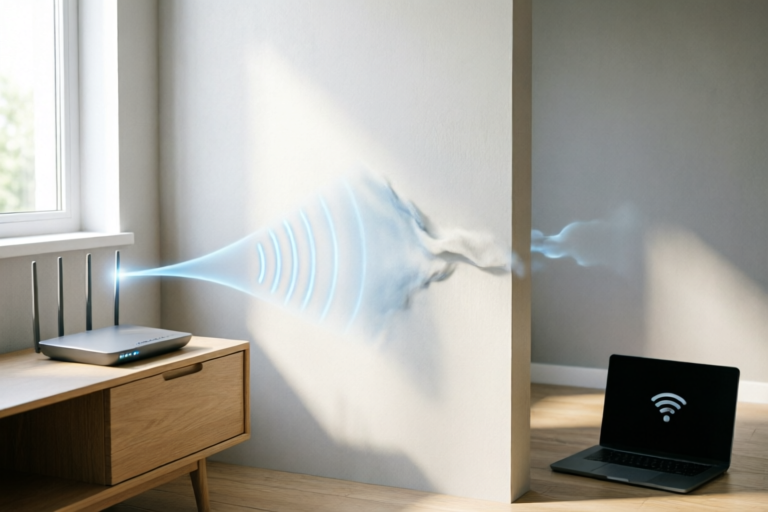
In today’s hyper-connected world, the internet is not just a luxury; it is a utility as essential as electricity and water. We expect seamless streaming, lag-free gaming, and rapid downloads regardless of where we stand in our homes or offices. Yet, a frustrating reality remains for millions of users: the WiFi signal weakens significantly when walls come between the router and the device. You might have strong reception in the living room, but stepping into the bedroom or basement leaves you with spotty service. Why does this happen? It is not merely a malfunction of your equipment, but a fundamental interaction between physics and architecture.
Understanding why walls degrade WiFi performance requires delving into the nature of electromagnetic waves and how they interact with solid matter. This comprehensive guide explores the science of WiFi propagation, analyzes the impact of construction materials, and offers practical strategies to mitigate signal loss. By the end of this article, you will possess the knowledge to diagnose your network bottlenecks and implement effective improvements for a robust wireless environment.
## 1. Fundamentals of WiFi Signal Propagation
To understand why a wall can stop a WiFi signal, we must first understand what a WiFi signal actually is. Contrary to popular belief, WiFi does not transmit data via sound or light in the traditional sense visible to the human eye. Instead, it relies on radio waves. Specifically, WiFi utilizes specific bands within the radio spectrum, primarily operating at 2.4 Gigahertz (GHz), 5 GHz, and increasingly, 6 GHz for modern WiFi 6E and WiFi 7 standards.
### The Nature of Electromagnetic Waves
Radio waves are a type of electromagnetic radiation. These waves travel outward from the source—in this case, your router’s antennas—in a spherical pattern. Think of ripples spreading across a pond after a stone is thrown, but imagine the ripples extending in three dimensions rather than two. The energy carried by these waves oscillates electric and magnetic fields perpendicular to the direction of wave propagation. This transmission allows data to travel through the air without physical wires, converting digital information (zeros and ones) into modulated radio frequencies.
The ability of these waves to reach your smartphone, laptop, or smart TV depends on several factors inherent to the physics of electromagnetism. First, the intensity of the signal decreases over distance. This phenomenon is known as free-space path loss. Even in an empty open field, a signal will become weaker the further it travels from the antenna simply due to the expansion of the wavefront. However, in a built environment, this natural degradation is compounded significantly by obstacles.
### Line-of-Sight vs. Non-Line-of-Sight Transmission
In an ideal scenario, such as a large open warehouse or a stadium, WiFi devices maintain a clear line-of-sight relationship. The transmitter sees the receiver directly. In this condition, the signal propagation is most efficient. However, residential and commercial buildings create non-line-of-sight environments. Walls, furniture, appliances, and even people act as obstructions. When a radio wave encounters an object that is not part of its intended path, several things occur simultaneously. Some energy bounces off the surface, some passes through it, and some is absorbed by it. It is this division of energy that dictates signal strength on the other side of the barrier.
It is also important to note that WiFi operates similarly to a walkie-talkie system. It requires the device and the router to "hear" each other. As the wave interacts with the environment, the clarity of that voice degrades. Background noise from other electronic devices and neighboring WiFi networks adds interference, making the received signal-to-noise ratio worse. But the primary culprit for dropping signals behind walls remains the physical interaction between the radio wave and the building structure itself.
## 2. How Physical Barriers Cause Signal Attenuation
When a WiFi signal strikes a wall, it undergoes a process called attenuation. Attenuation is the gradual loss of intensity as the signal moves away from its source, but in the context of walls, it refers specifically to the reduction in signal power caused by the material passing through. This loss happens through three primary mechanisms: absorption, reflection, and scattering.
### Absorption of Radio Energy
Absorption is often the most significant factor in signal loss. As electromagnetic waves penetrate a material, the atoms and molecules within that material absorb the energy of the wave. This absorbed energy is typically converted into heat, although the amount is negligible for WiFi levels. Materials rich in electrons or containing conductive elements tend to absorb radio frequencies more aggressively.
For example, if a radio wave hits a thick piece of wood, some energy enters the pores of the wood. The organic compounds and moisture within the wood trap this energy, preventing it from continuing forward. The more dense the material, the more atoms it has per cubic inch for the waves to interact with, leading to greater absorption. This is why a signal might pass easily through a thin door but struggle through a masonry wall. The wave literally loses its "power budget" trying to push through the atomic resistance of the barrier.
### Reflection and Multipath Interference
Not all signal energy makes it through a wall. A portion reflects off the surface back towards the source or sideways. While reflection might seem harmless, it contributes to a phenomenon known as multipath interference. Reflected waves eventually reflect again off other surfaces like floors, ceilings, or windows before reaching the receiver.
If these reflected waves arrive at the receiver at slightly different times compared to the direct wave, they can interfere with each other. Sometimes they reinforce the signal (constructive interference), but often they cancel each other out (destructive interference). Because walls cause complex reflection patterns, especially those with multiple layers or metallic components, the net result at the receiving device can be a chaotic mix of signal peaks and valleys. This fluctuation causes the intermittent drops that users experience when walking around their rooms.
### Scattering and Diffraction
Scattering occurs when the radio waves encounter objects that are roughly the same size as the wavelength. In a typical office with cubicles or a home with textured walls, plastic fixtures, or metal filing cabinets, the signal gets scattered in many directions. Diffraction allows waves to bend slightly around sharp edges, but this bending causes energy loss. A hard-edged concrete wall creates a significant shadow zone behind it where the diffracted waves are too weak to support high-speed connections. This "shadowing effect" is the reason why a corner of a room or a basement area often feels like a dead zone.
Water vapor and liquid water are particularly hostile to WiFi signals. Human beings, who are approximately 70% water, and heavy rainstorms can attenuate signals significantly. However, the largest source of moisture-related attenuation in buildings is often hidden within the walls themselves—drywall joint compound, plaster, or even the insulation used between stud cavities. These materials hold varying amounts of moisture, which alters the dielectric constant of the barrier, impacting how much signal is blocked.
## 3. Role of Construction Materials in Signal Loss
Not all walls are created equal. The composition of the materials used in your building plays a decisive role in how much WiFi signal penetrates from one room to another. Understanding the dielectric properties of common construction materials allows you to predict weak spots in your network.
### Wood and Drywall: The Least Restrictive Barriers
Standard interior partition walls constructed from wooden studs covered with drywall (gypsum board) offer minimal resistance to WiFi signals. These materials are relatively porous and have low density compared to structural elements. A single layer of drywall typically reduces signal strength by only a few decibels (dB).
Wood varies, however. Softwood frames allow better penetration than hardwood doors. More importantly, hollow spaces between studs contain air, which does not impede radio waves. Consequently, moving a router from the kitchen into the hallway adjacent to the bedroom often results in negligible signal change if the walls are simply framed. Paint and paper wallpaper also have a negligible impact, though metallic wallpapers can occasionally introduce minor reflections.
### Brick and Concrete: The Heavyweights
Load-bearing walls pose the greatest challenge. Brick, cinder block, and poured concrete are dense materials filled with aggregates like sand and gravel. They act as formidable shields for radio waves. A standard brick wall might reduce signal strength by 15 to 20 dB, while a reinforced concrete slab could attenuate the signal by 30 dB or more.
This is why signals struggle to penetrate exterior walls or floors in multi-story apartments. The reinforcement bars (rebar) embedded within the concrete create a Faraday cage effect. Metal acts as a conductor, absorbing and reflecting radio waves so efficiently that almost none penetrate through. If your home has concrete foundations or steel-reinforced structures, expect the basement or rooms surrounded by these elements to suffer from poor connectivity unless repeaters are deployed.
### Glass and Mirrors: Surprisingly Dense
Modern glass windows are generally good for WiFi penetration. Standard float glass absorbs very little signal. However, tempered glass or insulated glazing units (double-pane windows) can present challenges due to the metal oxide coatings sometimes applied to achieve energy efficiency. More critically, mirrors contain a silver backing. Silver is highly reflective to radio frequencies. A full-length mirror can scatter a signal as effectively as a small section of sheet metal. Therefore, placing a router directly behind a large mirror will likely cause a bottleneck.
### Metals and Moisture: The Ultimate Blockers
Any metallic surface is a signal terminator. HVAC ductwork, especially galvanized steel ventilation pipes running through ceilings or walls, can disrupt signals. Similarly, cable television boxes or electrical conduits containing copper wiring run alongside these paths. Metal framing in modern commercial construction is designed for durability, but it inadvertently builds a radio-shielded cage around every room.
Additionally, consider water pipes. While PVC pipes are transparent to WiFi, older copper plumbing or PEX tubing contains metal connectors and joints. In regions where homes are lined with radiant heating pipes filled with fluid, these systems can absorb thermal energy but also dampen radio frequencies. Waterlogged insulation or leaks within the wall cavity are silent killers of WiFi performance, often undetected until a major infrastructure inspection.
## 4. Frequency Wavelength and Obstacle Penetration
One of the most critical variables in understanding wall penetration is frequency. WiFi routers often operate on dual-band or tri-band systems, offering both 2.4 GHz and 5 GHz (or 6 GHz) options. While higher frequencies promise faster speeds, they do not negotiate with walls as skillfully as lower frequencies.
### The Physics of Frequency and Wavelength
Frequency and wavelength are inversely related. The 2.4 GHz band has a longer wavelength (approximately 12.5 cm), while the 5 GHz band has a much shorter wavelength (approximately 6 cm). This difference dictates how the waves interact with obstacles.
Lower frequency waves, with their longer wavelengths, behave more like ocean swells. They have enough mass and momentum to flow over smaller obstacles and curve slightly around larger ones (diffraction). When they hit a wall, the energy distribution is spread out over a larger cycle, meaning the wave can induce current in the material with less drastic energy loss per unit of distance. This is why 2.4 GHz is often described as having better "range" and "penetration."
Higher frequency waves behave more like bullets or laser beams. Their shorter wavelengths require straighter lines of sight to propagate effectively. They are more easily reflected, scattered, and absorbed by small irregularities on a wall's surface. When a 5 GHz wave hits a concrete wall, it lacks the wavelength resilience to bounce off or penetrate as deeply as a 2.4 GHz wave. The result is a stronger signal indoors initially, but it dies off much faster once it encounters physical barriers.
### Comparing Band Performance Through Walls
Imagine walking through a hallway with a single door. At 2.4 GHz, you might notice the speed dropping slightly as you close the door, but it remains usable. At 5 GHz, closing that same door might sever the connection entirely. This trade-off is deliberate: 5 GHz channels offer more bandwidth and less congestion from neighbors because there are more available channels. They are designed for high-throughput scenarios where distance and barriers are minimized.
However, in multi-room households, the 5 GHz signal may fail to cover the perimeter of the house effectively. Many modern routers default to 5 GHz only to maximize speed, leaving users struggling in distant rooms. Users must weigh the desire for gigabit speeds in the living room against the necessity of basic internet access in the bedroom. Often, the "best" connection is a compromise between speed and stability, depending on the activity.
Furthermore, environmental clutter affects frequencies differently. Household electronics like cordless phones, microwave ovens, and baby monitors operate at 2.4 GHz. While this frequency penetrates walls better, it is also more prone to interference from other noise. Conversely, 5 GHz suffers less interference from household appliances, but its susceptibility to walls means a single obstacle can negate its immunity to noise.
## 5. Summary and Effective Mitigation Solutions
To recap, the WiFi signal drops when walls block it because of the physical laws governing electromagnetic radiation. Density, moisture content, and conductivity determine how much energy is lost. Dense materials like concrete and metal absorb and reflect radio waves, creating shadow zones. Lower frequencies (2.4 GHz) penetrate barriers better than higher frequencies (5 GHz), albeit with potentially lower speeds. Understanding these mechanics helps us formulate solutions.
### Optimizing Router Placement
Before purchasing expensive hardware, optimize your current setup. Place your router in a central location within your home. If your apartment is L-shaped or elongated, place the router closer to the geometric center rather than tucked in a far corner. Mounting the router on a high shelf prevents floor-level obstructions like sofas or pet beds. Keep the device away from walls to allow omnidirectional radiation, rather than forcing half the signal into the drywall behind it.
Avoid placing routers inside entertainment centers made of metal or near large televisions with magnetic shielding. Elevating the device allows the waves to travel horizontally across the floor plan rather than getting trapped by floor debris. Additionally, ensure vents in the room are not obstructed by furniture, as airflow can affect router cooling and sustained performance.
### Upgrading Network Hardware
If placement adjustments fail, hardware upgrades are necessary. Wi-Fi extenders plug into wall outlets and repeat the signal. While cost-effective, they often halve the bandwidth for connected devices because they must receive and retransmit data using the same radio channel.
A superior alternative is a Mesh Wi-Fi system. Mesh nodes communicate with each other wirelessly (or via wired backhaul) to create a unified network. They manage handoffs seamlessly as you move rooms, eliminating the weak points caused by walls. Systems like Eero, Google Nest Wifi, or Netgear Orbi use dedicated radios to talk to each other, preserving bandwidth for your actual data.
Another solution is Powerline Adapters. These devices transmit data over the existing electrical wiring in your home. Since electricity flows through walls without impediment, you can bypass architectural barriers entirely by plugging an adapter in the router's room and another in the target room. This provides a wired-like connection for stationary devices, reducing reliance on wireless signal strength.
### Channel Management and 2.4GHz Usage
Utilize the 2.4 GHz band strategically. For smart home devices, video calling, and browsing in distant rooms, switch your device profile to prefer 2.4 GHz. For HD streaming in the same room as the router, lock to 5 GHz. Modern routers with "Smart Connect" automatically select the best band, but manual intervention is sometimes required for optimal performance. Adjusting channel width in settings can also help; narrower channels are more resilient to interference in crowded housing complexes.
### Final Thoughts on Network Stability
Building design inevitably impacts wireless technology, but knowledge empowers control. You cannot change the concrete foundation of your home, but you can adapt your network topology to suit it. By combining strategic placement, modern mesh technology, and an understanding of signal behavior, you can minimize the frustration of dropped connections. The goal is not to defeat the physics of walls, but to engineer a pathway that ensures your data reaches every corner of your sanctuary.
Investing time in network optimization yields dividends in productivity and relaxation. Stop accepting dead zones as inevitable; treat them as solvable engineering challenges. With the right approach, your WiFi can become as consistent as the power running to your lights.
Comments

laggy_lego
this explains my gaming lag perfectly. thought my isp was acting up
👍 5👎 0

tech_reader
glad you kept it simple. made way more sense than other tech blogs
👍 17👎 0

budget_broke
guess im buying a mesh system next. annoying to pay for upgrades every year
👍 7👎 0

call_guy
switched back to 2.4g for calls and my wife stopped yelling at me again lol
👍 0👎 0
freq_freak
quick q : does 6ghz penetrate walls any better or is it even worse than 5ghz?
👍 17👎 0

wall_warrior
metal really kills it right? weird how it works similar to microwaves
👍 25👎 0
signal_seeker
never thought concrete sucked up the signal that hard. moving router finally worked tho
👍 14👎 0