Technology & Internet
Why Does a Wi-Fi Signal Weaken Near Thick Walls?
Connect Everywhere, Even Behind the Wall
## Introduction: Recognizing Wi-Fi Signal Obstacles
In the modern era of digital connectivity, having reliable access to the internet is no longer a luxury; it is a fundamental necessity. Whether we are attending virtual meetings, streaming high-definition movies, or engaging in online gaming, the stability of our connection determines our productivity and entertainment experience. However, most homeowners have experienced the frustrating reality of strong Wi-Fi signals weakening as they walk away from the router. This phenomenon becomes particularly noticeable near thick interior walls. You might start in the living room with three solid bars of signal strength, but once you cross the threshold into a bedroom separated by a concrete partition, that signal might drop to a single bar or disappear entirely, causing buffering videos and failed uploads.
While this issue is common, many users attribute it simply to distance from the source. Yet, even when standing a few feet away from the router, a thick concrete wall can sever the connection. Understanding why this happens requires delving into the physics of wireless communication and the specific architectural characteristics of our homes. This article aims to demystify the science behind Wi-Fi signal degradation. We will explore how electromagnetic waves interact with physical matter, analyze the impact of different building materials, compare the performance of various frequency bands, and finally, offer practical solutions to mitigate these obstacles. By the end of this guide, you will not only understand why your Wi-Fi struggles behind a wall but also know how to overcome it effectively.
## Physics of Propagation: How Electromagnetic Waves Move
To comprehend why walls affect Wi-Fi, we must first understand what Wi-Fi actually is. At its core, Wi-Fi operates using radio frequency (RF) waves, which are a type of electromagnetic radiation. These waves travel outward from the router's antennas in a spherical pattern, carrying data encoded within them. Just like visible light allows us to see, or X-rays allow doctors to see through skin, radio waves carry energy that propagates through space. However, unlike light, these waves have specific frequencies that dictate their behavior when interacting with matter.
When a Wi-Fi signal travels through the air, it experiences a natural loss of power known as free-space path loss. As the distance increases, the wavefront spreads out, reducing the intensity per unit area. However, this is the least of our concerns compared to obstacles. When these radio waves encounter solid objects, such as walls, they undergo several critical phenomena defined by physics:
### Attenuation
Attenuation refers to the gradual reduction in the strength of the signal as it passes through a medium. Think of it like trying to shout through a thick curtain; your voice gets muffled because the material absorbs some of the acoustic energy. Similarly, dense materials absorb a portion of the electromagnetic energy converting it into heat. The denser and thicker the material, the higher the attenuation. For home users, this translates directly to fewer available "bits" reaching your device, resulting in lower speeds and potential disconnections.
### Absorption
Absorption is closely related to attenuation but focuses specifically on the material's ability to trap the energy. Materials containing water are excellent absorbers of RF energy. Since human bodies are mostly water, and many construction materials hold moisture, this effect is significant. For instance, if a wall is damp or made of materials that retain humidity, the Wi-Fi signal will lose more energy traversing it. The molecular dipoles in the material oscillate in response to the electromagnetic field, consuming the signal's energy to generate frictional heat.
### Reflection
Not all signal energy is lost when hitting a wall. Some of it bounces back. This is called reflection. While this sounds useful, uncontrolled reflection often leads to multipath interference. This occurs when multiple copies of the same signal arrive at the receiver at slightly different times. The waves interfere with each other constructively or destructively, creating dead spots in a room where the signal cancels itself out. Thick walls increase the complexity of reflections, acting as mirrors for radio waves and scattering them unpredictably throughout the space.
### Scattering
Scattering happens when the signal hits irregular surfaces or rough textures. Instead of reflecting cleanly like a mirror, the wave is scattered in multiple directions. Inside a wall, rebar, brick edges, and uneven plaster can cause this scattering. This dissipates the energy further, reducing the coherent signal that manages to punch through to the other side. Together, attenuation, absorption, reflection, and scattering constitute the hostile environment that Wi-Fi signals face when navigating a building's infrastructure.
## Impact of Building Materials on Signal Strength
The composition of the walls in your home is arguably the most significant variable in determining how well your Wi-Fi penetrates them. Not all walls are created equal, and manufacturers often categorize them by their "path loss" ratings in engineering terms. Knowing which materials block signals helps in predicting weak zones before they become a problem.
### Drywall and Wood Framing
For many suburban homes, the most common wall construction consists of wooden studs covered by gypsum board (drywall) on both sides. This structure offers the least resistance to Wi-Fi signals. Drywall is relatively thin and non-conductive, allowing radio waves to pass through with minimal attenuation. Wood framing also permits good transmission. Consequently, if your house is primarily built with these materials, you may find that Wi-Fi extends quite well through multiple partitions, though still diminishing with every additional layer.
### Brick and Masonry
Traditional brick walls present a more formidable challenge. Brick is denser than drywall and wood, leading to higher attenuation. A single layer of brick can reduce signal strength by a significant percentage, forcing the router to work harder to push the signal through. Multi-layer masonry walls compound this issue. If you live in a row house or an apartment complex constructed from brick blocks, you might experience a noticeable drop in performance between rooms. This is why outdoor-to-indoor signals are notoriously difficult; the exterior brick facade acts as a primary barrier.
### Concrete and Reinforced Structures
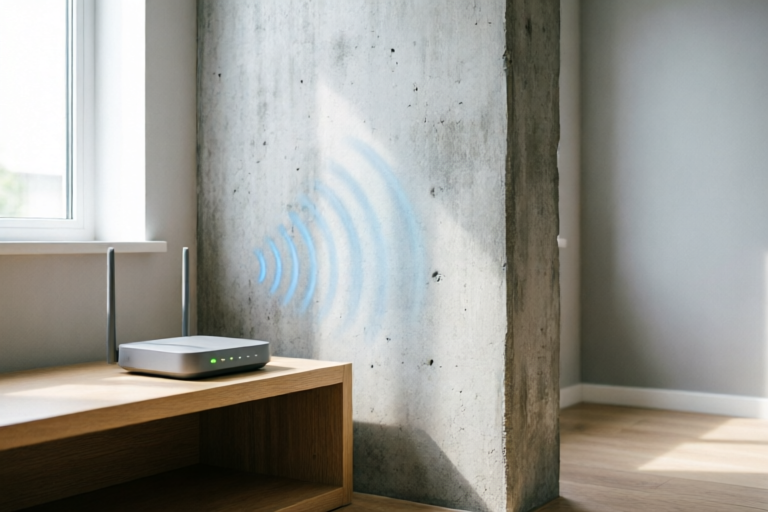
Concrete is the ultimate enemy of long-range Wi-Fi penetration. It contains aggregates like gravel and sand, as well as cement, which are dense and conductive. In commercial buildings and high-rise apartments, structural concrete walls are often reinforced with steel rebar (reinforcing bars) to ensure stability. Steel is highly reflective to radio waves. When a Wi-Fi signal hits a steel-reinforced wall, it encounters a Faraday cage effect. The metal mesh inside the concrete reflects and absorbs almost all incoming signal energy, leaving little to pass through to the other side. This explains why Wi-Fi coverage in basements or upper floors of concrete skyscrapers is often patchy despite routers being located nearby.
### Special Insulation and Foil Barriers
Modern energy-efficient homes often incorporate advanced insulation methods that can surprisingly degrade Wi-Fi performance. Radiant barriers, often found as aluminum foil sheets installed behind drywall or under roof decking, are designed to reflect thermal heat. Unfortunately, metals like aluminum are also excellent reflectors of radio frequencies. If your home has foil-backed insulation, your Wi-Fi signals hitting those walls will be reflected rather than absorbed, preventing them from passing through. This creates a situation where signals bounce harmlessly off walls rather than traveling to the next room, effectively compartmentalizing your network.
### Glass Windows
It is also important to consider glass. Standard residential glass is transparent to Wi-Fi, offering excellent signal passage. However, modern energy-efficient windows often have a low-emissivity (Low-E) coating. These microscopic metallic coatings reduce thermal transfer but simultaneously reflect radio waves. This means that a large expanse of glass can sometimes act as a blocker, especially if the router is placed right next to a Low-E window, trapping the signal inside the room.
## Frequency Differences: Range Versus Penetration
Once we understand the physical barriers, we must examine the tools we use to fight them: the frequency bands of your Wi-Fi router. Modern dual-band and tri-band routers operate on two main frequencies: 2.4 GHz and 5 GHz, with newer routers adding 6 GHz. Each frequency band behaves differently when encountering obstacles.
### The Physics of Wavelength
The behavior of waves is dictated by their wavelength relative to the size of the obstacle. Lower frequencies have longer wavelengths, while higher frequencies have shorter wavelengths. The 2.4 GHz band has a wavelength of approximately 12 centimeters, whereas the 5 GHz band has a wavelength of roughly 6 centimeters. Longer waves generally diffract better around obstacles and penetrate solid materials more effectively because they can flow around small imperfections in the wall structure. Shorter waves, like those at 5 GHz, are more line-of-sight oriented and behave more like light beams, getting blocked or absorbed more easily by dense objects.
### Performance Trade-offs
This brings us to the classic compromise in networking: speed versus range. The 5 GHz band offers significantly faster data rates because it utilizes wider channels and less crowded spectrum availability. However, this comes at the cost of poor wall penetration. If you place a router in the center of a large apartment, a device connected to 5 GHz might perform admirably in the adjacent room but suffer severely in the farthest corner behind a thick wall. Conversely, the 2.4 GHz band sacrifices maximum throughput for superior range and penetration. It is much more capable of squeezing through a thick concrete wall to reach a basement or garden shed. Therefore, for devices located behind heavy obstacles, connecting to the 2.4 GHz band often results in more stable connections, even if the download speeds are slower.
### Interference Issues
It is crucial to note that the 2.4 GHz band has a downside: congestion. Because many household appliances (like microwave ovens, Bluetooth speakers, and cordless phones) utilize this frequency, the environment can be noisy. While 2.4 GHz penetrates walls well, a noisy environment can cause packet loss and jitter, degrading the perceived quality of the connection despite strong signal bars. On the 5 GHz band, there is less interference, but the lack of penetration means if the wall blocks the signal completely, the noise floor doesn't matter—the connection drops anyway.
### Emerging Technologies: Wi-Fi 6 and Wi-Fi 6E
With the introduction of Wi-Fi 6 (802.11ax) and Wi-Fi 6E, we now have the added option of the 6 GHz band. This offers massive bandwidth and incredibly fast speeds, ideal for 4K streaming and VR. However, like 5 GHz, the 6 GHz band suffers from poor penetration properties. Its short wavelengths make it very susceptible to obstruction by walls. Thus, while it provides the best performance in open areas, it is unlikely to replace 2.4 GHz as your primary solution for navigating thick interior barriers in larger homes.
## Conclusion: Summary and Simple Solutions
### Recap of Signal Degradation Factors
Throughout this exploration, we have established that Wi-Fi signal weakening near thick walls is a predictable outcome governed by the laws of physics. Dense building materials like concrete and steel rebar absorb and reflect electromagnetic energy, causing significant attenuation. Furthermore, higher frequency bands like 5 GHz and 6 GHz trade penetration capabilities for raw speed, making them vulnerable to obstructions that lower frequency 2.4 GHz signals could theoretically overcome. Environmental factors, including moisture in walls and metal insulation, further exacerbate these issues.
### Optimal Router Placement
The first step to mitigating these problems is strategic placement. Ideally, the router should be positioned centrally within your home. Placing it in a corner or tucked away inside a cabinet creates asymmetrical coverage. Elevating the router is also beneficial, as signals propagate better downwards than upwards through floors. Ensuring the router is kept away from large metal objects, fish tanks, and direct contact with walls can help optimize the initial broadcast before the wall absorption occurs.
### Utilizing Wi-Fi Extenders and Mesh Systems
If moving the router is not possible due to structural limitations, upgrading the network hardware is the logical next step. Traditional Wi-Fi extenders can rebroadcast the signal, extending the range into dead zones. However, they can halve the bandwidth. A more modern solution is a Mesh Wi-Fi System. Unlike repeaters, mesh nodes communicate seamlessly, allowing your devices to roam across the network without dropping connection. By placing one node near the thick wall blocking the signal, you essentially bypass the barrier, bringing the source of the connection closer to the user.
### Hardwiring for Stability
For stationary devices like smart TVs, gaming consoles, or desktop computers, nothing beats the reliability of a wired Ethernet connection. Although running cables through thick walls can be difficult (often requiring professional help or existing conduits), utilizing Powerline adapters is a viable workaround. These adapters transmit network data over the electrical wiring of your home, effectively ignoring the RF obstacles of thick walls. This ensures that devices in remote corners receive full-speed internet regardless of their structural isolation.
### Final Thoughts
Understanding the relationship between your physical environment and your wireless network empowers you to build a more robust infrastructure. By acknowledging that walls are not mere passive dividers but active participants in signal attenuation, you can take informed steps to improve your connectivity. Whether by optimizing settings, upgrading to a mesh system, or leveraging lower frequencies for distant devices, you can ensure that your Wi-Fi remains strong and fast, no matter what stands between you and your router. In the world of wireless technology, knowledge is indeed the strongest signal booster of all.
Comments

short_comment
mind blown
👍 9👎 0

lazy_admin
yea... my office wall is probably blocking the path. gonna need that mesh system link.
👍 18👎 0

tech_savvy_01
cool science stuff here. didn't know metal studs acted like mirrors for radio waves.
👍 26👎 0

random_guy
simple solutions section saved me, gonna move the router to the center of the house.
👍 22👎 0

nethead_mike
finally makes sense why my downstairs has good service but upstairs is garbage.
👍 20👎 0

query_user
wait so thicker walls always mean worse? what about plaster walls though?
👍 12👎 0

broke_my_wifi
i swear my speedtest drops by half the second i walk into the garage. turns out the door is full of steel.
👍 18👎 0