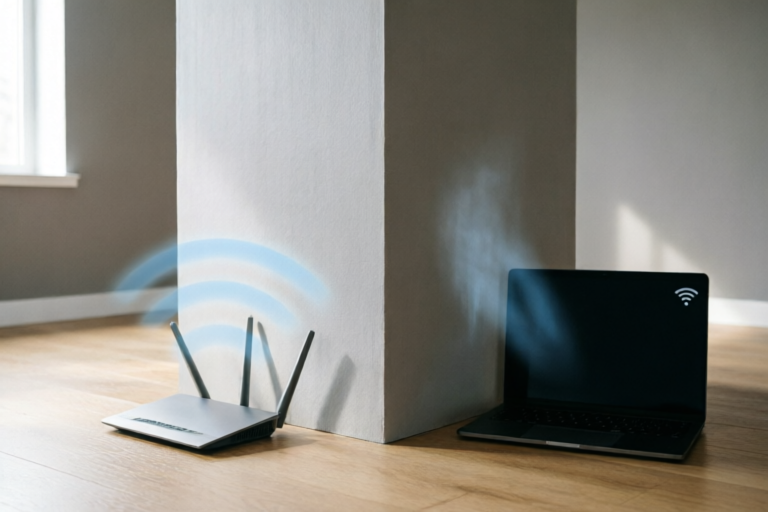
Why Does WiFi Speed Drop When Walls Block Signal?
Connect Everywhere, No Matter Where Walls Stand
Introduction: Navigating the Invisible Barrier of WiFi Signals
In the modern digital age, our lives are tethered to the internet. From remote work setups and video conferencing to streaming high-definition entertainment and smart home management, reliable connectivity is no longer a luxury—it is a fundamental utility. Yet, few things frustrate homeowners and tech enthusiasts more than the sudden degradation of internet speeds simply by moving from one room to another. You step out of the living room, cross the hallway, and suddenly your video stream buffers or your download meter crawls to a halt. The culprit behind this frustrating phenomenon is often invisible: the walls themselves.
When we speak of "walls blocking signal," we are referring to the physical obstacles present within our homes and offices that interfere with the radio waves carrying our data. These barriers are part of what makes indoor networking so complex. While wireless technology promises freedom of movement, it operates within a confined space filled with physical limitations. The walls surrounding us are not merely passive dividers; they are active participants in the equation of signal integrity. They absorb, reflect, and scatter the electromagnetic waves that constitute our WiFi connection.
This article aims to demystify the technical reasons behind WiFi slowdowns caused by physical obstructions. We will explore the underlying physics of radio wave propagation, analyze how different construction materials interact with WiFi frequencies, and compare the behaviors of 2.4GHz versus 5GHz bands. Furthermore, we will provide actionable strategies to mitigate these issues. Understanding the relationship between your infrastructure and your network hardware is the first step toward reclaiming full-speed connectivity throughout your entire property.
The Science of Signal Loss: How Walls Interfere with Electromagnetic Waves
To understand why WiFi slows down behind a wall, we must first grasp the nature of the signal itself. WiFi uses radio waves, which are a form of electromagnetic radiation similar to visible light but at a much lower frequency and longer wavelength. These waves travel outward from the router antenna in all directions (ideally), carrying encoded data packets to your devices. However, unlike fiber optic cables which guide light through a dedicated path, wireless signals propagate freely through the air until they encounter an obstacle.
Physics of Interaction: Absorption, Reflection, and Scattering
When an electromagnetic wave hits a physical barrier like a wall, three primary phenomena occur simultaneously:
Absorption: This is the process where the energy of the radio wave is converted into heat or lost within the material. Materials with high moisture content or metallic composition tend to absorb more energy. As the signal passes through, its amplitude decreases. If too much energy is absorbed before the signal reaches your device, the receiver cannot decode the data effectively, leading to errors, retransmissions, and ultimately slower perceived speeds.
Reflection: Similar to how light bounces off a mirror, radio waves can bounce off hard surfaces such as concrete, metal siding, or even glossy tiles. While reflection is necessary to allow signals to reach corners (non-line-of-sight propagation), excessive reflection creates a problem known as "multipath interference." This happens when multiple versions of the same signal arrive at the receiver at slightly different times. The original signal and the reflected echo can cancel each other out or corrupt the data packet, forcing the system to request a resend of the information.
Scattering: When a radio wave encounters a surface that is rough or uneven relative to its wavelength, it scatters in random directions. This dissipates the signal's power across a wider area rather than concentrating it toward the receiver. Walls covered in textures, plaster, or insulation often cause significant scattering, reducing the strength of the directed beam reaching your smartphone or laptop.
Signal-to-Noise Ratio (SNR) and Attenuation
The metric most directly affected by walls is the Signal-to-Noise Ratio. As walls weaken the intended signal (attenuation), the background noise floor remains relatively constant. A high SNR means strong signal over weak noise, resulting in fast data transfer. A low SNR, caused by attenuated signals, forces your modem to negotiate lower modulation levels (switching from 64-QAM to 16-QAM or lower), which reduces the amount of data carried per second. Essentially, the wall acts as a dimmer switch for your internet, and as the signal fades, the router compensates by reducing the bandwidth to maintain a stable, albeit slower, connection.
Material Impact: Concrete, Wood, and Metal vs. WiFi Strength
Not all walls are created equal. The type of material used in construction plays a pivotal role in determining how many walls you can traverse before your speed drops critically. Different substances have varying dielectric constants and conductivities, which dictate how they interact with radio frequencies.
Drywall and Gypsum Board
If you live in a modern residential apartment built primarily of drywall (gypsum board), you are in luck. Drywall is relatively thin and non-conductive. It causes minimal signal attenuation. Typically, a single layer of drywall might reduce WiFi signal strength by only 2 to 5 dB. You can easily pass through two or three layers of drywall without noticing a significant drop in throughput. This is why open-plan layouts connected by drywall partitions generally perform well.
Wood Framing and Timber
Wood is a common structural material, particularly in framing. Solid wood beams are denser than drywall and can absorb more energy. However, the variation in wood density affects results unpredictably. Wet wood absorbs more RF energy than dry wood due to the water molecules resonating with the frequency. While a wooden door usually isn't a major blocker, solid timber framing within a wall can create localized dead zones. Insulation materials placed inside stud cavities (fiberglass, cellulose) can also affect the signal, adding another 2-3 dB of loss per layer.
Concrete and Masonry
This is the nemesis of WiFi connectivity. Reinforced concrete contains steel reinforcing bars (rebar), which act as a Faraday cage, effectively reflecting and shielding electromagnetic waves. Even without metal, the density of poured concrete requires massive signal strength to penetrate. A single layer of reinforced concrete wall can attenuate signal strength by 10 to 15 dB or more. In multi-story buildings constructed entirely of concrete, you may find that a floor below or above becomes unreachable with a single router. Water pipes and wiring chases embedded within concrete further complicate the transmission path.
Metal and Foil Barriers
Any structure containing metal is essentially a shield against radio waves. This includes metal stud framing, metal roofs, aluminum siding, and even energy-efficient windows with metallic films. Some wallpaper brands include foil backing designed for thermal insulation, which surprisingly can act as a significant barrier to WiFi signals. Because metals are excellent conductors, they do not absorb the wave but reflect it entirely, preventing passage. If your router is separated from your device by a metal cabinet or ductwork, the signal path is likely broken.
Glass and Windows
Glass itself is transparent to radio waves to a degree, but window glass poses two problems. First, double-glazed windows contain a gap filled with gas or air, and often a low-emissivity (Low-E) coating on the inner pane. This coating is metallic and reflective, which can cut signal strength by several decibels depending on the angle. Second, large panes of glass can cause specular reflection if the router is outside or vice versa, bouncing the signal away from the intended indoor path.
Frequency Trade-offs: Why 5GHz Slows Down More Than 2.4GHz
A crucial factor in wall-induced signal loss is the frequency band your router is using. Modern routers typically operate on two bands: 2.4GHz and 5GHz (and increasingly 6GHz for Wi-Fi 6E). Each band has distinct characteristics regarding range, speed, and ability to penetrate solids.
Wavelength and Penetration Power
The physics of wave propagation dictates that longer wavelengths (lower frequency) generally have better diffraction and penetration capabilities. The 2.4GHz band has a longer wavelength (approximately 12.5 cm) compared to the 5GHz band (approximately 6 cm). This difference allows 2.4GHz signals to bend around corners and pass through solid objects more effectively. Imagine trying to throw a basketball through a hole in a fence (2.4GHz) versus a marble (5GHz). The larger ball might get stuck, but the physics of water waves show that lower frequency waves spread more easily through apertures.
The Range vs. Speed Dilemma
Because of the lower frequency, 2.4GHz travels farther and penetrates walls better. However, it suffers from higher congestion. Almost every Bluetooth device, microwave oven, baby monitor, and older cordless phone operates on 2.4GHz. This crowded spectrum leads to increased interference, slowing down effective data rates despite better penetration.
Conversely, the 5GHz band offers significantly higher speeds because it has more available channels and wider channel widths. It was designed for high-throughput applications like 4K streaming. However, its shorter wavelength means it is more easily absorbed by walls. It behaves more like visible light—excellent for direct visibility (speed) but poor at passing through opaque objects. Moving through a single interior wall can cause 5GHz signal strength to plummet dramatically, whereas 2.4GHz might barely notice the transition.
Automatic Band Steering Challenges
Many modern mesh systems and routers feature "band steering," automatically connecting devices to the best available band. Sometimes, this algorithm favors the stronger signal. If 5GHz is too weak through a wall, the device switches to 2.4GHz. While you remain connected, the speed drops drastically. Conversely, if the device stubbornly tries to hold onto 5GHz, it may experience constant disconnection loops or buffer retries, making the connection feel unusable even if 2.4GHz would have sufficed.
Conclusion: Strategies to Maintain High-Speed Connections Indoors
Understanding that walls inevitably impact WiFi speed empowers you to take proactive steps in network design. There is no magic cure that eliminates all attenuation, but strategic planning can minimize its effects, ensuring that your entire home enjoys high-speed performance regardless of physical layout.
Optimal Router Placement
The location of your wireless access point is paramount. Avoid hiding the router in a closet, corner, or cabinet. Place it centrally in your home, elevated on a shelf rather than on the floor. Ideally, position it near the center of the heaviest usage area and keep it away from large appliances like microwaves and refrigerators, which emit interference. Line of sight is ideal; if the shortest path involves a thick masonry wall, consider moving the router to a central hallway or living space where fewer barriers exist between the source and destination.
Leverage Wired Backhauls and Access Points
For severe cases involving concrete walls, wireless repeaters often degrade performance further. Instead, run Ethernet cable to the problematic areas and install Wireless Access Points (WAPs). This connects the AP via a wire to the main router but broadcasts a fresh signal from the room itself. This bypasses the need for the signal to travel through the walls physically. Powerline adapters offer an alternative where you use existing electrical wiring to transmit data, though this can vary in stability depending on the house's wiring age.
Utilize Dual-Band Capability Strategically
Do not rely solely on one band. Configure your devices manually. Connect stationary high-bandwidth devices like Smart TVs, PCs, and gaming consoles to 5GHz (provided they have a direct line of sight to the router). Leave IoT devices like smart bulbs, thermostats, and vacuums on 2.4GHz, as they require less bandwidth and benefit from better range. Separating the networks (SSIDs) gives you control over which radio frequency each device uses, optimizing overall network health.
Upgrade Hardware and Consider Mesh Systems
Older routers often struggle with modern standards like MU-MIMO (Multi-User, Multiple Input, Multiple Output) and Beamforming. These technologies help direct signal strength specifically toward devices rather than broadcasting uniformly. Upgrading to Wi-Fi 6 or Wi-Fi 6E routers can significantly improve resilience to interference. For large homes with many rooms, a Mesh WiFi System is superior to a single high-power router. A mesh system uses multiple nodes placed in different rooms, creating a unified network that hops signal from node to node rather than relying on a single signal traversing every wall.
Final Thoughts on Network Stability
While walls are static obstacles, your network strategy can adapt to them. By acknowledging the physics of attenuation, understanding material differences, and balancing frequency trade-offs, you can mitigate the invisible barriers slowing down your connection. A little knowledge of radio wave physics goes a long way in transforming your home from a collection of disconnected rooms into a seamlessly integrated digital hub. With the right configuration, you can ensure that distance and obstruction never come between you and the information you need.
Comments

always blame the walls until you read this. time to buy a mesh system i guess

my gaming lag gets so bad when i go up the stairs lol. totally forgot about the frequency thing here
great read! so i guess placing the router near a window isn't actually better than having it open in the middle?

does anyone else have metal studs in their house? my wifi dies instantly there compared to regular drywall

makes sense now. tried switching to 5ghz everywhere but downstairs was dead. going back to 2.4ghz in those rooms

wow never realized concrete blocks signals like that. used to think it was just my isp being slow lol