Technology & Internet
Why Does WiFi Signal Strength Decrease Near Thick Walls?
Connect Without Boundaries
# Why Does WiFi Signal Strength Decrease Near Thick Walls?
## Introduction: Understanding the WiFi Signal Barrier
In our increasingly digital world, the reliability of our wireless internet connection has transitioned from a luxury to a fundamental utility. Whether you are engaging in remote work, streaming high-definition video, participating in online gaming tournaments, or simply connecting your smart home devices, a consistent WiFi signal is non-negotiable. Yet, few frustrations rival the sudden loss of signal when moving from a hallway into a room divided by a massive concrete partition or an exterior load-bearing brick wall. It often feels magical that a device can communicate wirelessly across rooms, yet equally frustrating when that magic fades the moment a barrier intervenes.
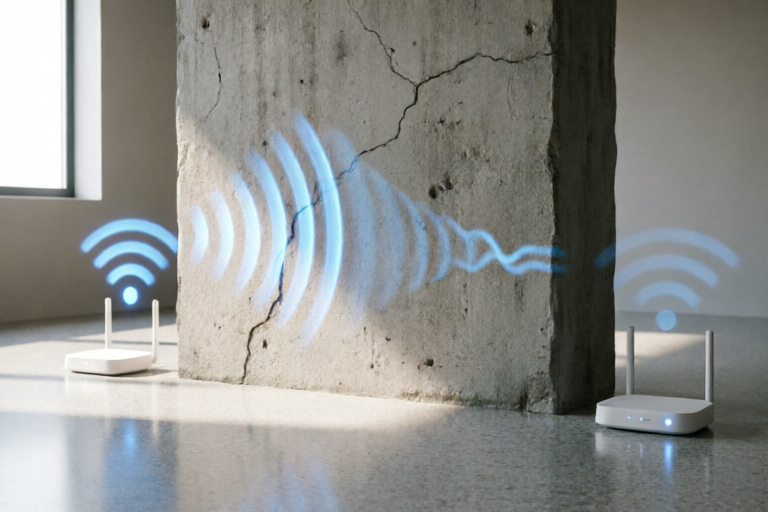
To understand why WiFi signal strength decreases near thick walls, we must look beyond simple intuition and examine the underlying technology. WiFi operates as a wireless communication protocol using radio waves, specifically within the unlicensed Industrial, Scientific, and Medical (ISM) bands. These radio waves travel through the air in a manner analogous to light or sound, propagating outward from the source antenna. While the vacuum of space allows these waves to travel effortlessly, terrestrial environments are cluttered with obstacles. Physical obstructions like thick walls act as significant barriers to the free propagation of electromagnetic waves. When these waves encounter matter, several processes occur simultaneously: part of the energy bounces off, part passes through, and part is absorbed.
The primary issue leading to signal degradation is not merely the thickness of the wall, but the composition and density of the materials used to construct it. As a user moves further away from the router or crosses thicker boundaries, the signal undergoes attenuation. Attenuation refers to the gradual loss of intensity as an electromagnetic wave travels through a medium. This reduction in power results in lower data transfer rates, increased latency, and ultimately, a disconnection. This article aims to dissect the scientific reasons behind this phenomenon. We will explore the physics of signal attenuation, analyze the impact of various building materials, compare the performance of different frequency bands, and conclude with robust mitigation strategies to ensure seamless connectivity throughout your living or working space.
## Physics of Signal Attenuation
At the heart of WiFi communication lies the principle of electromagnetism. WiFi routers transmit data via radio frequency electromagnetic waves. These waves consist of oscillating electric and magnetic fields perpendicular to each other and the direction of propagation. When these waves propagate through free space, they experience what is known as Free Space Path Loss (FSPL). Even in a completely empty void, the signal spreads out over a larger area as distance increases, causing the energy per unit area to drop exponentially according to the inverse-square law. However, physical obstructions introduce complexities far greater than simple geometric spreading.
### Absorption and Energy Conversion
When a WiFi signal encounters a material, the electromagnetic energy interacts with the atoms and molecules within that material. One of the most significant mechanisms for signal loss is absorption. During absorption, the energy of the electromagnetic wave is transferred to the matter it passes through, typically converted into heat. Materials with high dielectric constants are particularly effective at absorbing radio waves. Water molecules, for instance, are highly polar, meaning they have a positive charge on one side and a negative charge on the other. Because water is polar, it responds strongly to the oscillating electric field of a WiFi signal. In walls, drywall may seem light, but moisture trapped within construction materials or human bodies can dramatically increase absorption. Essentially, the wall converts your WiFi energy into thermal energy, weakening the signal on the other side.
### Scattering and Diffraction
Another critical process is scattering. When a radio wave hits a rough surface or a collection of smaller objects (like the aggregate stones in concrete), the wave energy is scattered in multiple directions rather than continuing along its original path. This scattering reduces the amount of coherent energy available at the receiving antenna. If the wall surface is uneven or porous, more scattering occurs. Furthermore, diffraction plays a role. Diffraction is the bending of waves around obstacles. While helpful to a degree, allowing signals to bend slightly around doorframes or sharp edges, thick walls present a massive obstruction that exceeds the diffractive capacity of the radio waves. The wavefront cannot easily "bend" around a thick structural element; instead, it gets blocked, reflected, or absorbed.
### Reflection and Multipath Fading
Thick walls often contain conductive elements, such as metal studs or rebar. When electromagnetic waves strike a conductive surface, they reflect much like light reflects off a mirror. This creates multipath fading. Instead of taking a direct path to your phone, the signal reflects off the wall and arrives at a slightly delayed time. When multiple versions of the same signal arrive at the receiver at different times and phases, they can interfere with each other constructively (boosting signal) or destructively (canceling the signal out). In a scenario involving thick walls, destructive interference is common, leading to "dead zones" where the signal appears to vanish despite being physically close to the router, simply because the geometry of reflections works against you.
## Impact of Building Materials
Not all walls are created equal. The attenuation capability of a wall depends heavily on its constituent materials. Architects and builders choose materials based on structural integrity, insulation, and cost, which inadvertently dictates WiFi performance. Understanding the specific impact of these materials helps in diagnosing where signal drops occur.
### Concrete and Cement Block
Concrete is perhaps the most notorious WiFi enemy. Standard reinforced concrete consists of cement, sand, aggregate, and steel reinforcement bars (rebar). The density of concrete is very high compared to residential drywall, meaning it has more mass for the signal to pass through. Every centimeter of concrete attenuates the signal significantly. More critically, the steel rebar embedded within the concrete acts as a secondary barrier. Steel is highly conductive to electricity. Consequently, it reflects radio waves efficiently. A concrete wall isn't just a thick insulator; it is essentially a layered shield combining absorption from the cement and reflection from the metal grid. This is why basements or interior load-bearing walls made of poured concrete often result in zero WiFi signal in adjacent rooms unless specialized equipment is used.
### Brick and Mortar
Solid brick walls pose similar challenges to concrete, though the magnitude varies based on the thickness and type of brick used. Common clay bricks are porous and absorb some energy, while mortar acts as a binder that also adds density. Older buildings constructed with traditional brick often lack the metallic reinforcement found in modern concrete slabs, which makes them slightly better for WiFi penetration than concrete, but still formidable obstacles. Exterior walls made of brick, especially those with heavy insulation fillings (which often contain moisture or fiberglass), create a compounded barrier. The combination of the brick outer layer, insulation middle layer, and gypsum inner layer represents a multi-layered filter that chips away at signal strength at every step.
### Metal Reinforcement and Foil Insulation
In modern construction, energy efficiency is paramount. To achieve high R-values (insulation ratings), builders often install radiant barriers or foil-faced foam boards. Aluminum foil is a perfect conductor for electromagnetic radiation. Installing a continuous layer of foil-backed insulation inside a wall cavity can create a partial Faraday cage effect. This means the wall actively repels the radio waves rather than letting them pass. This is particularly problematic for attics or rooms surrounded by high-performance insulation. Similarly, any metal plumbing pipes, HVAC ductwork, or steel framing studs running through or adjacent to the wall path can drastically reduce signal penetration.
### Wood and Drywall
On the other end of the spectrum, wood-framed walls with standard drywall (gypsum board) are relatively transparent to WiFi signals. Drywall is low-density and lacks significant conductive or moisture-retaining components. Wood framing (studs) introduces some interruption, but wooden beams do not conduct electricity and generally allow frequencies to pass through with minimal loss. This is why open-concept designs or older wood-frame houses often exhibit better WiFi distribution than modern high-rise apartments built with concrete cores. However, if the wood is treated with fire retardant chemicals containing salt or other conductive compounds, it can degrade the signal slightly. Generally, passing through a single layer of drywall and wood studs is almost negligible in terms of signal loss.
## Frequency Band Characteristics
WiFi routers typically broadcast on two primary frequency bands: 2.4 GHz and 5 GHz (and increasingly 6 GHz with WiFi 6E and 7). These frequencies behave differently when interacting with solid structures due to the relationship between frequency and wavelength. This difference creates a classic trade-off between range/penetration and speed/capacity.
### 2.4 GHz: The Long-Range Survivor
The 2.4 GHz band operates with a longer wavelength. According to physics, longer wavelengths tend to penetrate solid objects more effectively than shorter wavelengths. This is because the physical dimensions of the atoms in the wall material are closer in size to the wavelength of higher frequencies, leading to easier resonance and absorption. Conversely, at 2.4 GHz, the waves are large enough to bypass smaller imperfections in the wall structure and diffract around minor obstacles better. For a user standing behind a thick concrete wall trying to connect a basic smartphone or IoT device, the 2.4 GHz band is almost always the more reliable choice regarding connectivity itself. However, this benefit comes at a steep cost: bandwidth congestion.
### 5 GHz: The Speed Demon
The 5 GHz band offers significantly faster data speeds and less interference from neighboring networks and devices like microwaves or Bluetooth. However, the 5 GHz signals have shorter wavelengths. Shorter wavelengths struggle to penetrate dense materials. They are more likely to be reflected or absorbed by thick walls. A 5 GHz signal that could cut through drywall effortlessly might be completely extinguished by a brick wall that is only a few inches thick. Therefore, while your phone might show strong WiFi bars on 5 GHz in the kitchen, stepping into the next room separated by a thick load-bearing wall may cause the device to disconnect or fall back to 2.4 GHz. This switch back to 2.4 GHz is often seamless for the OS but noticeable in performance if the 2.4 GHz signal is weak on the far side of the wall.
### 6 GHz and Higher Frequencies
With the advent of WiFi 6E and WiFi 7, new channels operating at 6 GHz and above are becoming common. While these offer gigabit-level speeds and ultra-low latency, they suffer from the worst penetration capabilities. The physics dictates that as frequency increases toward millimeter-wave ranges, signal attenuation by physical obstacles increases dramatically. Walls become nearly impenetrable shields at these frequencies. This necessitates denser infrastructure, such as many access points, rather than relying on a single router pushing a strong signal across floors and rooms.
### Channel Width and Data Rate
Beyond penetration, the way data is encoded affects throughput. Modern routers use techniques like OFDM (Orthogonal Frequency-Division Multiplexing) which splits data into smaller chunks sent on different sub-channels. Strong signal strength allows for higher modulation schemes (like 1024-QAM), sending more bits per cycle. Weak signal strength degrades this modulation scheme down to simpler formats (like QPSK) to maintain reliability. Therefore, crossing a thick wall doesn't just slow down the connection temporarily; it forces the router and client to negotiate a much slower, safer handshake. This drop in data rate is often what users perceive as "sluggish internet" despite having signal bars.
## Conclusion and Mitigation Strategies
Having explored the physics of signal attenuation, the material science of construction, and the nuances of radio frequency bands, it becomes clear why thick walls are the primary culprits behind poor WiFi performance. The solution is not simply "turn up the power," as legal transmission limits exist. Instead, successful network optimization requires a strategic approach to hardware placement and topology.
### Strategic Router Placement
The most cost-effective first step is optimizing the current router's location. The router should ideally be placed centrally within the footprint of the home or office, elevated off the floor, and kept away from corners, cabinets, or behind electronic appliances that emit interference (like microwaves). If a central location is impossible due to architectural constraints, consider placing the router closer to the high-traffic areas or the rooms that require the strongest signal, accepting that distant rooms will suffer. Avoid placing the router inside media consoles, which are often lined with metal, blocking upward radiation patterns.
### Utilizing WiFi Mesh Systems
For large homes with multiple thick walls, a single router—even a powerful one—cannot cover the entire area efficiently. This is where WiFi Mesh Systems shine. Unlike traditional range extenders which create a separate SSID or repeat the signal in a half-duplex manner (cutting speed in half), mesh systems consist of multiple nodes that talk to each other seamlessly. You can place one node in the master room and another on the far side of a thick wall. The nodes form a backhaul network, ensuring the device connected to the outer node receives a strong local signal without traversing the wall alone. This distributes the radio environment evenly.
### Hardwiring with Ethernet Backhaul
If a wired connection is feasible, running Cat6 Ethernet cables to the locations with poor signal is the gold standard. You can then connect an Access Point to the cable to broadcast a fresh WiFi signal from that corner. This avoids the wall issue entirely because the backbone is physical copper, immune to RF attenuation. Many modern mesh systems support an "Ethernet Backhaul" mode where the satellite nodes connect via wires, creating a lightning-fast internal network that bridges walls invisibly.
### Upgrading to WiFi 6 and 7 Standards
Newer routers utilize technologies designed to overcome interference and congestion better. Beamforming is a technique where the router focuses the signal directly toward the connected device rather than broadcasting in all directions. This directional focus increases effective range and penetration capabilities. Additionally, MU-MIMO (Multi-User Multiple Input Multiple Output) allows the router to serve multiple devices simultaneously, reducing the wait time that exacerbates latency issues in congested walls.
### Troubleshooting Tools
Before purchasing expensive new gear, use WiFi analyzer apps on smartphones to visualize the signal landscape. These tools show signal heatmaps, identifying exactly which walls correlate with the biggest drops. By mapping these dead zones, you can pinpoint if the issue is a specific heavy-metal door, a water pipe, or a specific concrete column. Sometimes, the solution involves simple renovations, such as replacing a metal mesh screen on a window with a plastic alternative that blocks cellular and WiFi signals alike.
### Final Thoughts
nThe journey to perfect WiFi coverage is a balancing act between physics, architecture, and technology. Thick walls are an inevitable feature of secure, insulated, and durable buildings. By understanding that the walls are physically transforming your digital energy, you can make informed decisions to mitigate these losses. Whether through adopting a mesh network, utilizing 2.4 GHz for range-critical devices, or hardwiring access points, there is always a technical workaround. By applying these strategies, you can transform the obstacle of the thick wall into a manageable variable, ensuring your network remains as solid and stable as the building itself.
## Frequently Asked Questions
### Can a powerful antenna fix a signal blocked by concrete?
While a high-gain antenna can improve reception in open spaces, thick concrete absorbs and scatters energy regardless of initial power. An antenna helps direct the energy, but it cannot fundamentally change the absorption properties of the concrete. For concrete walls, a repeater or mesh node placed closer to the target zone is more effective.
### Does opening a window help the signal?
Opening a window might help if the wall is partially obstructed by external debris, but it primarily aids if the router signal is entering through that window. Windows often contain metal coatings (low-e glass) which block WiFi. A plain glass pane is permeable, but the overall improvement is situational.
### Why is my 5 GHz signal gone but 2.4 GHz is okay?
This confirms the physics discussed earlier. 5 GHz has shorter wavelengths that cannot penetrate the wall well. 2.4 GHz has longer wavelengths that diffract and penetrate better. Your device falls back to 2.4 GHz automatically to maintain the connection, prioritizing connectivity over speed.
### Is it safe to live near a high-power WiFi base station?
Yes. WiFi uses non-ionizing radiation. The power levels are strictly regulated by government agencies (like the FCC) and are far below the thresholds known to cause biological harm. However, placing the router directly under a mattress is not recommended simply to avoid heating up electronics or creating unnecessary noise.
### Should I turn off the router at night?
Turning off the router saves electricity and prevents potential sleep disturbances from LED lights, but it does not improve the performance of the signal when turned back on. Signal physics does not reset overnight.
Comments

WiFiWonderer
great breakdown didnt realize radio waves work exactly like light being absorbed by matter
👍 16👎 0

NoSignalZone
the bathroom is always a dead zone in my house probably because of pipes and tile acting like barriers
👍 15👎 0

StreamerDad
added a cheap repeater between the router and gaming room. huge improvement! should have done this sooner
👍 4👎 0

TechGuru101
never realized the metal rebar inside concrete played such a big role. guess thicker walls just act like shields
👍 18👎 0
SpeedyConnie
so does that mean i should stay on 2.4GHz for longer range even if download speeds drop? confused there lol
👍 16👎 0

BrickHouseBob
I live in an old apartment with solid brick walls and my WiFi cuts out the second I walk to the kitchen. Finally makes sense why.
👍 19👎 0