Technology & Internet
Why does Wi-Fi signal weaken when passing through metal objects?
Seamless Connection, Uninterrupted Signal
**Understanding the Invisible Battle: Why Does Wi-Fi Struggle Against Metal?**
In the modern digital age, Wi-Fi has become as essential as electricity itself. We rely on wireless connectivity for remote work, entertainment, smart home automation, and critical communications. However, despite the advancements in technology, a common frustration persists among users: sudden drops in connection speed or complete dead zones within their own homes and offices. While many factors contribute to poor connectivity, one of the most significant and physically limiting obstacles is the presence of metal. If you have ever noticed that your video calls buffer when you stand next to a refrigerator, or that the internet fails in a server room filled with steel racks, you have witnessed the invisible battle between electromagnetic waves and conductive materials. This article delves deep into the scientific principles explaining why this happens and provides actionable solutions to mitigate the issue.
**The Core Question**
Why does a signal that travels freely through air struggle immensely against a solid surface? To answer this, we must look beyond simple obstruction and understand the nature of light and radio waves. Wi-Fi operates using electromagnetic radiation in the radio frequency spectrum. Unlike visible light, which we can see interacting with glass or walls, radio waves interact with the atomic structure of matter differently. When these waves encounter metal, a unique physical phenomenon occurs that acts as a barrier, a mirror, or an absorber. By understanding the mechanics of this interaction, users can transform their network environment from a battlefield into a seamless communication highway.
## The Physics: How Radio Waves Meet Conductors
To grasp why metal hampers Wi-Fi, we must first establish a fundamental understanding of what Wi-Fi actually is. Wi-Fi signals are a form of electromagnetic radiation. Just as visible light allows us to see our surroundings, radio waves carry information across space from your router to your devices. These waves consist of oscillating electric and magnetic fields perpendicular to each other. When these fields propagate through a vacuum or air, they face minimal resistance because air molecules are sparse and generally non-conductive. However, the moment these fields encounter a medium with high electrical conductivity, such as copper, aluminum, steel, or even water-saturated concrete with rebar, the physics changes dramatically.
### Understanding Electromagnetic Radiation and Conductivity
Metals possess a property known as electrical conductivity, which stems from the presence of "free electrons." In an insulator like plastic or wood, electrons are tightly bound to their atoms and cannot move freely. In contrast, in a metallic lattice structure, valence electrons are delocalized. They flow easily from atom to atom when subjected to an electric field. This abundance of free electrons is what makes metals excellent conductors for power transmission, but it creates a severe problem for wireless signals.
When a Wi-Fi electromagnetic wave strikes a metal surface, the electric component of the wave exerts a force on these free electrons. According to Coulomb's law, opposite charges attract, causing the electrons to accelerate towards the positive side of the electric field. Because there are so many electrons available, they rush together in large numbers almost instantaneously. This movement of charge constitutes an electric current. However, unlike a wire connected to a power source where the current flows smoothly to perform work, these induced currents happen at the microscopic surface level of the metal.
### The Role of Free Electrons and Induction
This rapid movement of electrons generates its own electromagnetic field. Here lies the crux of the problem. According to Lenz's Law in physics, the direction of this induced field opposes the change that produced it. Essentially, the metal creates a counter-field that is equal in magnitude but opposite in polarity to the incoming Wi-Fi wave. When two waves are perfectly out of phase, they cancel each other out. This phenomenon effectively nullifies the incident Wi-Fi signal right at the boundary of the metal. Consequently, the energy from the Wi-Fi wave does not pass through; instead, it is converted into another form of energy or reflected back to its source. This interaction is the primary reason why metals act as near-perfect shields for radio frequencies.
## Key Mechanisms: Reflection and Absorption
Once we understand that the metal interacts with the wave at the electron level, we can categorize what happens to the signal energy. It does not simply disappear; it undergoes conversion and redirection. There are two primary mechanisms at play: reflection and absorption. Understanding which mechanism dominates helps in diagnosing signal loss patterns.
### Reflection: The Bounce Effect
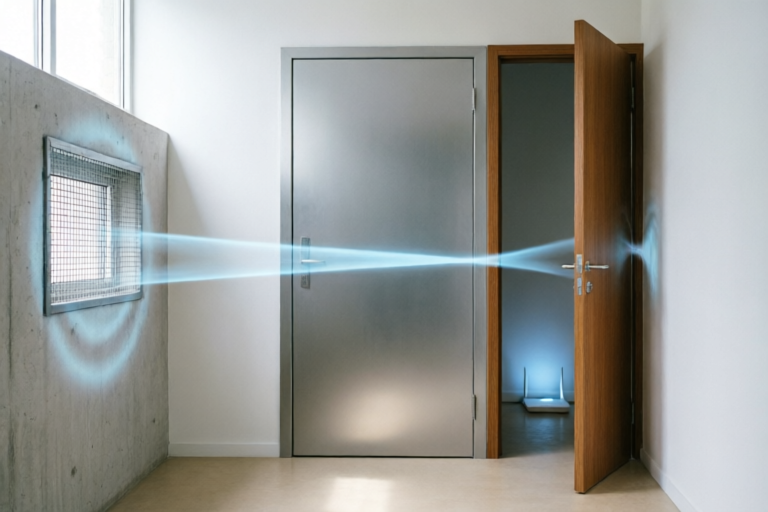
Reflection is the most immediate consequence of Wi-Fi encountering a large metal object. Think of a metal sheet as a mirror for radio waves. Just as you cannot see through a silvered mirror in a bathroom, you cannot transmit a signal through a thin metal door. When the incoming wave hits the metal, the induced currents on the surface scatter the energy away from the wall. Most of the signal bounces back toward the source (the router).
This reflection causes several issues beyond simple blockage. First, it reduces the signal strength in the intended direction. Second, it creates multipath interference. Reflected signals may bounce off other surfaces and arrive at the receiver slightly later than the direct signal. Modern routers use complex algorithms to manage this, but excessive reflections can cause noise, degrading the Signal-to-Noise Ratio (SNR) and leading to slower data throughput or dropped packets. In environments heavily populated with metal—like server rooms or industrial kitchens—the sheer volume of reflections can create a chaotic acoustic-like field where the signal strength fluctuates wildly depending on the slight position of the device.
### Absorption: Energy Dissipation as Heat
While reflection sends energy back, absorption removes it from the equation entirely. As the electromagnetic wave attempts to penetrate the metal, the resistance to the flow of induced currents generates heat. This is the principle behind induction cooking and microwave ovens, although Wi-Fi operates at much lower power levels. Even though Wi-Fi energy is low compared to a microwave, the absorption process still results in a loss of signal intensity as it passes through conductive layers.
This is particularly relevant in thicker metals. If a signal tries to penetrate a thick steel beam, the energy dissipates exponentially as it travels through the material. This decay is described by the skin depth effect in physics. The skin depth defines how far a wave can penetrate into a conductor before its amplitude decreases significantly. For high-frequency Wi-Fi signals (5GHz or 6GHz), the skin depth in most metals is incredibly small, often measured in micrometers. This means practically no signal gets through thicker structural metals; it is all absorbed or reflected at the very surface layer.
## Real-World Impact: Common Metal Obstacles
Theoretical physics explains the mechanism, but daily life presents the challenge. Users often overlook specific items that disrupt their network until the connection fails. Identifying these obstacles is crucial for troubleshooting.
### Household Appliances and Enclosures
The modern kitchen and living room are hotspots for signal interference. Large appliances like refrigerators and washing machines are made of thick galvanized steel. A refrigerator, being large and grounded, acts as a significant Faraday cage, blocking signals that originate behind it or attempt to pass through it. Similarly, electronic enclosures for set-top boxes, televisions, and gaming consoles often contain shielding to prevent interference with internal components, but they also inadvertently block external signals.
Microwaves operate on the same frequency band as many older Wi-Fi standards (2.4GHz). While the casing is designed to keep radiation in, small leaks or poor sealing can cause significant interference. Additionally, computer towers, which often feature metal casings and ventilation grids, can obstruct the path between the router and nearby laptops.
### Structural Elements in Buildings
Beyond furniture, the building structure itself poses a risk. In commercial buildings and some modern residential constructions, steel beams are integral to the framework. These beams run horizontally and vertically throughout the office or apartment, creating a grid that traps and attenuates signals. Reinforced concrete often contains steel rebar mesh to add tensile strength. This rebar acts as a distributed shield, making it nearly impossible for strong Wi-Fi penetration through load-bearing concrete walls.
HVAC (Heating, Ventilation, and Air Conditioning) ductwork is another frequent culprit. Many large commercial ducts are made of galvanized steel. Running a network cable or placing an access point behind a massive air duct will result in zero connectivity in that sector. Even decorative metal elements like mirrors framed in steel, metal shelving units in retail spaces, and filing cabinets in offices contribute to the cumulative attenuation of the signal, slowly eroding range and stability.
## Solutions: Optimizing Your Network Layout
Knowing the enemy—metal—is half the battle. The other half is deploying strategies to bypass these obstacles. You cannot always remove a fridge or dismantle a steel beam, but you can adapt your network architecture.
### Strategic Router Placement
Positioning is the most cost-effective solution. The golden rule is line-of-sight. Whenever possible, place your router in a central location, elevated, and free from large metallic obstructions. Avoid placing the router inside a cabinet, especially a wooden one painted with conductive finishes, or worse, a metal locker. Elevating the router helps the signal spread above floor-level clutter, including metal furniture legs.
Orienting antennas is equally important. If your router has external antennas, do not align them parallel to each other. Instead, angle them orthogonally (one vertical, one horizontal) to capture different polarization states of the signal, as metal surfaces tend to reflect and polarize waves. Aim antennas toward the areas of highest traffic, avoiding pointing them directly at large metal walls.
### Leveraging Advanced Hardware
If relocation is impossible, hardware upgrades can compensate. Mesh Wi-Fi systems are superior to traditional range extenders because they utilize dedicated backhaul channels and intelligent routing. Mesh nodes can communicate with each other wirelessly, allowing signals to hop around metal obstacles rather than going straight through them. By placing multiple nodes strategically, you can create a web of connections that navigates around the "shadow" cast by metal structures.
Furthermore, consider utilizing dual-band or tri-band routers. The 5GHz and 6GHz bands offer faster speeds but less range and poorer wall penetration compared to 2.4GHz. While 2.4GHz penetrates walls better, it suffers more from congestion and microwave interference. In environments with many metal objects, finding the sweet spot between frequency bands is vital. High-gain directional antennas can also be used to "punch" signals through weak points where metal is less dense.
### Utilizing Non-Metallic Infrastructure
Where possible, choose installation paths that avoid metal conduits. Use plastic or PVC conduit pipes for wired extensions running through walls that contain metal studs. For access points, mount them on drywall or plaster surfaces rather than attaching them directly to exposed steel beams. Some modern solutions include Wi-Fi repeaters powered by Powerline adapters, but these also require careful consideration of the electrical wiring, which is sometimes routed through metal conduits that can induce noise.
Additionally, consider the use of fiber optic backbones for your infrastructure. Fiber is immune to electromagnetic interference. By moving the core network away from metal-heavy zones and feeding the local Wi-Fi access points via fiber, you isolate the backbone from the metal interference problem, ensuring the distribution network itself remains clean.
### Troubleshooting Checklist
For users currently experiencing issues, follow this step-by-step checklist:
1. Scan for interference: Use apps to visualize signal heatmaps and identify spots adjacent to metal appliances.
2. Relocate: Move the router at least three feet away from large steel appliances.
3. Isolate: Temporarily disconnect metal-rich devices to see if speed improves.
4. Update: Ensure firmware is updated, as newer modulation techniques handle noise slightly better.
5. Test Frequencies: Switch devices to 5GHz if you are close to the router, or 2.4GHz if you must pass through moderate barriers.
## Frequently Asked Questions
### Can painting walls help with metal interference?
Standard paint does not stop Wi-Fi. However, specialized conductive paints exist, which would actually worsen the situation by turning the wall into a Faraday cage. Only non-conductive insulation materials or drywall thickness adjustments might help slightly, but removing the metal source is necessary for true fixes.
### Do metal mesh screens block Wi-Fi?
Yes. Window security meshes or privacy screens made of fine steel wires can attenuate signals significantly. This is why some homes experience better reception when windows are open. Using outdoor-rated antennas mounted outside the window can solve this.
### Does metal furniture affect Bluetooth too?
Yes. Bluetooth operates at similar frequencies (2.4GHz). The physics apply universally to radio waves. If metal ruins Wi-Fi, it will likely degrade Bluetooth audio quality or keyboard responsiveness as well.
## Conclusion
The weakening of Wi-Fi signals when passing through metal objects is a predictable outcome of electromagnetic physics. The high conductivity of metals induces currents that reflect and absorb radio energy, effectively creating a shield against wireless communication. While we cannot change the laws of physics, we can design our environments and network infrastructures to respect them. By recognizing common metal obstacles like appliances, structural beams, and cabinetry, and implementing strategic placements, advanced hardware, and optimal cabling practices, users can overcome these challenges. In an increasingly connected world, ensuring your network is resilient against physical barriers is key to maintaining productivity and seamless communication. With the right knowledge, the invisible forces of electromagnetism can be managed, turning potential dead zones into areas of robust connectivity.
By adopting a proactive approach to network planning, homeowners and IT professionals alike can minimize the impact of unavoidable metal structures. Remember, Wi-Fi is not magic; it is science. Treat it with respect, observe the environment it must traverse, and optimize accordingly. Whether you are setting up a smart home, expanding an office network, or simply trying to stream your favorite show without buffering, understanding the relationship between waves and metal empowers you to build a stronger, more reliable connection for all your devices.
Comments

QuickReader
simple stuff actually makes sense thanks for breaking it down without jargon
👍 9👎 0

water_heater_worry
just moved my router next to my steel water heater and yeah lost half my bars instantly
👍 15👎 0

paint_it_green
does anyone know if painting metal walls helps? or does it have to be non-conductive material entirely?
👍 2👎 0

BuildItBob
super interesting read never looked at my cabling tray as a problem until now
👍 6👎 0

foilsurfer
wait so if i put tin foil over the router it blocks it completely right? trying not to make my home invisible
👍 20👎 0

loft_office_user
ugh finally understood why my laptop dies whenever im under the metal beam in my loft office...
👍 10👎 0